Note:- If you not attend out previous classes then first of all attend those both because those both are very important to improve your basics.
(adsbygoogle = window.adsbygoogle || []).push({});
An HTML element is defined by a starting tag. If the element contains other content, it ends with a closing tag, where the element name is preceded by a forward slash as shown below with few tags: Start Tag Content End Tag
– This is paragraph content. –
– This is heading content. –
.
So here
….
is an HTML element,
…
is another HTML element. There are some HTML elements which don’t need to be closed, such as ,
and
elements. These are known as void elements.
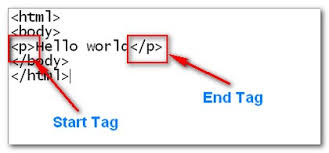
HTML documents consists of a tree of these elements and they specify how HTML documents should be built, and what kind of content should be placed in what part of an HTML document.
HTML Tag vs. Element-
An HTML element is defined by a starting tag. If the element contains other content, it ends with a closing tag.
For example,
is starting tag of a paragraph and
is closing tag of the same paragraph but
This is paragraph
is a paragraph element.
Nested HTML Elements
It is very much allowed to keep one HTML element inside another HTML element:
Example-
Nested Elements Example
This is italic heading
This is underlined paragraph
This will display the following result-
//pagead2.googlesyndication.com/pagead/js/adsbygoogle.js
(adsbygoogle = window.adsbygoogle || []).push({});
This is italic heading
This is underlined paragraph
Recommended for you-
 AZMOVIEZ